
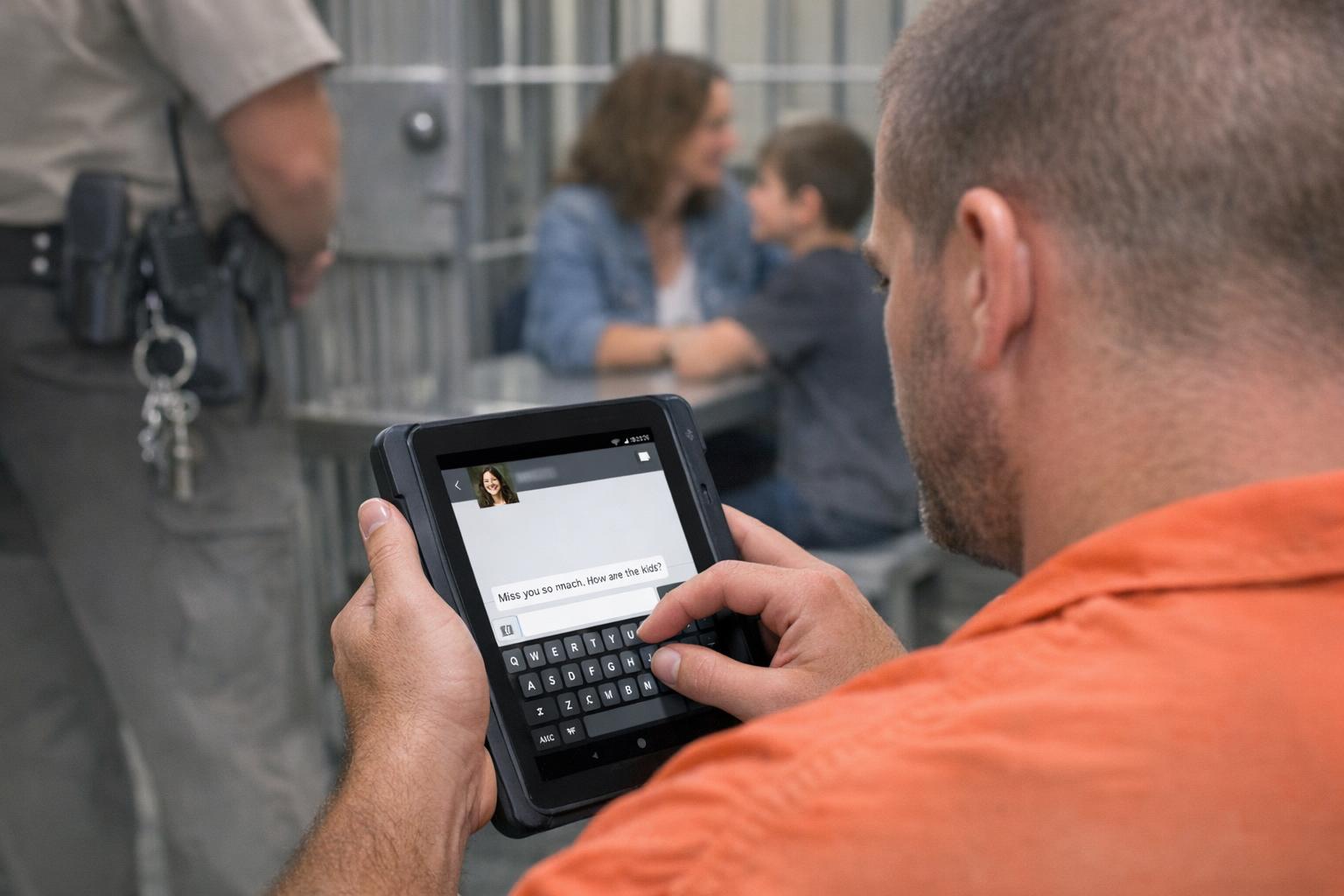
Tablet communication is different from the old collect call. It’s asynchronous, visible to staff, and built into an ecosystem that includes kiosks, commissary, and video visits. Families and staff both need clear, usable rules so expectations match reality.
## Inmate Tablet Messaging Explained: What Families Need To Know
Tablet systems are a tool first and a privilege second. When you send a message to someone inside, it flows through a vendor platform, into a monitored queue, and finally to the inmate’s tablet account. That path matters because it determines what gets read, what gets blocked, and how long a reply takes.
Most county and state systems provide text-like message threads that look familiar: you type, you hit send, and the message appears on the inmate’s device. But the message is not private. Correctional staff can filter, flag, or redact content. Expect delays. Typical hold times vary from immediate delivery to 24 or 48 hours depending on staffing and review rules. If a message contains prohibited content, it will be rejected and sometimes reported to the facility.
Families often ask whether photos, attachments, or contact info are allowed. Policies differ by facility. Some sites let you upload a single photo per message, with size and content restrictions. Others disallow images entirely. If you try to send phone numbers, addresses, or legal advice, expect those items to be removed. The platform logs every action — who sent the message, when, and what device it was viewed on. That audit trail is part of why tablet messaging has become an accepted alternative to phone calls.
### How Inmate Messaging Differs From Phone Calls
A phone call is a live interaction with emotional and timing nuances. Tablet messaging is asynchronous and recordable. That changes tone. People think in shorter bursts, and inmates learn to compose messages that fit the allowed length and content rules. For the family, that means fewer long rants and more concise updates: “How are you?” instead of a marathon conversation.
Also, cost models differ. Tablet messaging is typically cheaper for families than long-distance phone time, but vendors sometimes charge per message or per attachment. Staff should know the billing model because complaints and payment disputes are a steady stream of support tickets.
#### Message Flow And Monitoring
When someone sends a message, the platform runs it through automated filters first. Those filters catch keywords, blocked phrases, and disallowed attachments. After that, some systems forward messages to on-site or remote staff for human review. If the message passes, it’s delivered to the inmate’s tablet. If not, it’s flagged or rejected.
The review process is the point where policy meets practice. A message flagged for “gang-related language” might be caught by a broad filter even if the sender’s intent was harmless. Staff should have a quick escalation path to resolve false positives. Families should be told why something was blocked and what to avoid next time.
#### Allowed Content And Length Limits
Expect a character limit. Many systems cap messages at 1,000–2,000 characters. Attachments are limited by file type and size. Photos, if allowed, must not show contraband, other inmates, or locations inside the facility. Written content cannot contain explicit harassment, threats, escape plans, or illegal instructions. These rules look sensible on paper but get messy in real conversations. For example, a grieving parent describing a court hearing might trip filters that worry about coded language. Clear, specific examples in the policy reduce confusion.
## What Staff Need To Understand About Tablet Messaging
Tablet systems change daily operations. They reduce call volume but often increase written traffic. A facility that replaced half its phone minutes might see a doubling of message volume. That creates a different workload: reading, classifying, and responding to written inquiries instead of monitoring live calls.
Staff training must move beyond “don’t allow threats.” Personnel need familiarity with the platform interface, the vendor’s filter logic, and the legal limits on monitoring private communications. They also need protocols for when messages indicate a safety concern — suicidal language, threats of violence, or plans for escape.
### Security, Monitoring, And Privacy Rules
In many jurisdictions, inmates have very limited privacy expectations. Messages are treated like mail: subject to search and review. That doesn’t mean staff can act arbitrarily. There should be written policies that outline what reviewers may do, retention schedules, and how to handle third-party subpoenas. Clarity protects staff as well as inmates and families.
Technical security matters too. Vendor platforms must encrypt messages in transit and at rest. Access controls should limit who can view message logs. Audit trails are crucial when a family complains about an alleged deletion or when a message appears in court. Staff should be able to pull logs fast.
### Managing Workload And Resources
Monitoring messages takes time. Facilities should budget for it. Automated filters catch a lot but not everything. If you under-resource review teams, delays grow and complaints pile up. Some systems let facilities set different review levels: stricter for high-risk units, more permissive for general population. That flexibility helps match staffing to risk.
Training is part of the cost. A new officer who hasn’t seen the platform will be slower and more likely to make mistakes. Cross-training between review and classification staff reduces bottlenecks. Also, vendors sometimes offer managed review as a service. That reduces local labor needs but raises questions about oversight and accountability.
## Practical Advice For Families Using Tablet Messaging
Treat the tablet like a monitored voicemail that must follow rules. Start messages with neutral facts and avoid anything that could be misread as a coded directive. Don’t assume slang is safe. If a message gets blocked, read the rejection notification closely. Vendors often include a reason code and a short explanation. If not, call the facility’s support desk.
Be mindful of timing. If a message requires a quick reply — a court date change, for example — don’t rely solely on tablet messaging. Use the facility’s approved emergency contact channels. Tablet messaging is great for routine check-ins, photos of children, or coordinating commissary funds. It is not ideal for urgent legal or medical matters.
Try shorter messages. They’re easier to get through filters and quicker for inmates to read. If you need to convey a lot, break it into parts. Label attachments clearly. If you send a photo, crop out unrelated people and background that might be sensitive.
### Tips For First-Time Users
Make sure your account is verified and linked to the inmate’s profile. Most systems won’t deliver messages from unverified emails. Keep payment information up to date so messages with paid attachments aren’t stuck. Read the facility’s content policy once. It’s boring, but you’ll avoid surprises.
If you hit a wall, escalate politely. Many blocking decisions are reversible. Ask for the specific text or image that violated policy. If staff can’t help, vendors usually have an appeal process. Document everything — timestamps, screenshots, and support ticket numbers.
## Operational Problems Staff Should Watch For
False positives create friction. When innocuous messages are blocked repeatedly, inmates and families lose trust. Track the top reasons for rejections and adjust filters or training accordingly. A keyword that meant one thing outside can have a different meaning inside a facility. For example, a mention of “transfer” might be logistical in a family message but raise red flags if the context is different. Review patterns monthly.
Another issue is message flooding. When entire families switch to tablets, an inmate can receive dozens of messages a day. That sounds like a good problem until you see the strain on review teams. Consider inbox caps per inmate or per sender to keep volume manageable.
#### Handling Safety Alerts
Message systems often detect words like “kill,” “hurt,” or “escape,” and tag them for immediate review. That’s appropriate, but staff must separate genuine threats from context. A grieving letter that uses violent metaphors should be handled with sensitivity. Have a triage protocol: automated alert, quick human review, then follow-up actions only if the risk is real. Overreaction damages relationships; underreaction endangers people.
## Vendor Relationships And Contracts
Staff need to read the contract beyond prices and uptime guarantees. Look for specifics on data ownership, deletion policies, and access for law enforcement. Ask whether metadata is retained and for how long. Vendors might claim “secure storage,” but the facility needs to know where data lives and who can retrieve it. That matters if a message becomes evidence.
Also, evaluate the vendor’s support model. How quickly do they respond to fraud or abuse reports? What training do they provide? If the vendor offers managed monitoring, review their hiring practices and oversight. Don’t outsource oversight; maintain a local point of contact.
### Designing Policies That Work
Policies that sound good on paper fail when they ignore day-to-day realities. Build rules with input from corrections officers, mental health staff, and families. Test policies in a pilot before rolling out sitewide. Track key metrics: message volume, rejection reasons, average review time, and escalations. Metrics show where the system is working and where adjustments are needed.
Keep the human element front and center. Tablet messaging can reduce isolation, improve behavior, and make logistics easier. But it can also create new friction points: misunderstandings, privacy concerns, and workload pressures. Clear, practical rules and ongoing adjustments keep the system useful for everyone.
If you’re a family member struggling with message delivery, don’t assume malicious intent. Call the facility, get the reason for the block, and try again with a different phrasing. If you’re staff, document a pattern before changing policy. Small fixes now prevent big headaches later, and they help freindly communication survive in a constrained setting.





Leave a Reply